
Element34
SBOX Test Case Management
New · Test Case Management

Your test cases, in sync with every session.

SBOX Test Case Management keeps manual and automated testing in one place. Sessions on your private grid report straight into cases, runs and plans, and a verdict changed in either place shows up in the other. No result importers, no spreadsheets, no second tool to keep in step.

  • One capability: e34:tcmCaseKey
  • Runs in your private SBOX
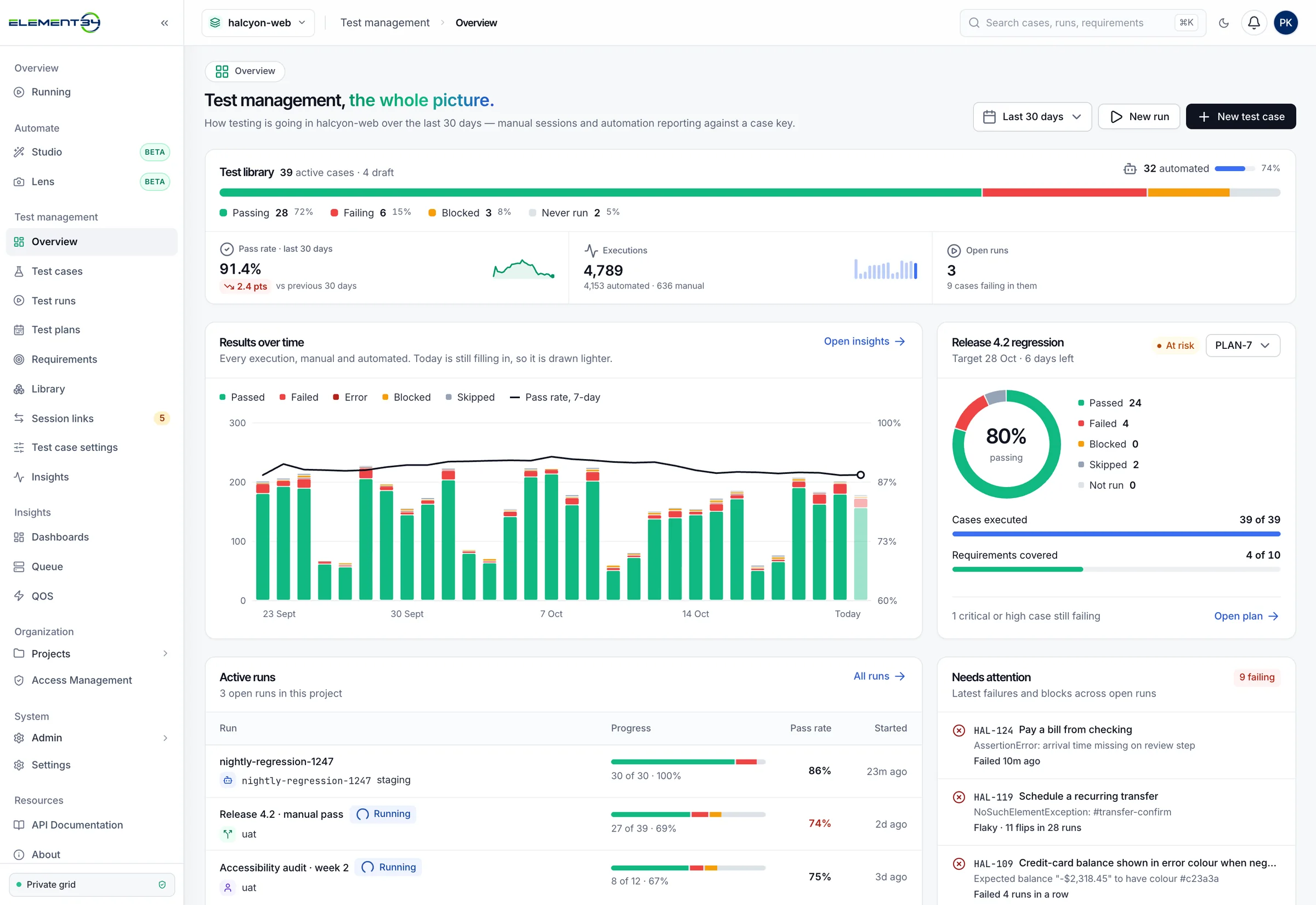
ui-v2/tcm · halcyon-web · overview
TCM overview: test library health bar, pass rate, results over time chart, Release 4.2 regression progress ring, active runs and cases that need attention.
1capability links a test to its case
2directions of verdict sync
10insights dashboards, built in
0result files to upload or import
Two-way sync with SBOX sessions

One case. One session. Always in step.

Most test management tools sit outside the grid and wait for someone to upload results. TCM is part of SBOX, so every session that names a case reports to it, and every verdict a person records flows back to the session.

In SBOX · the session
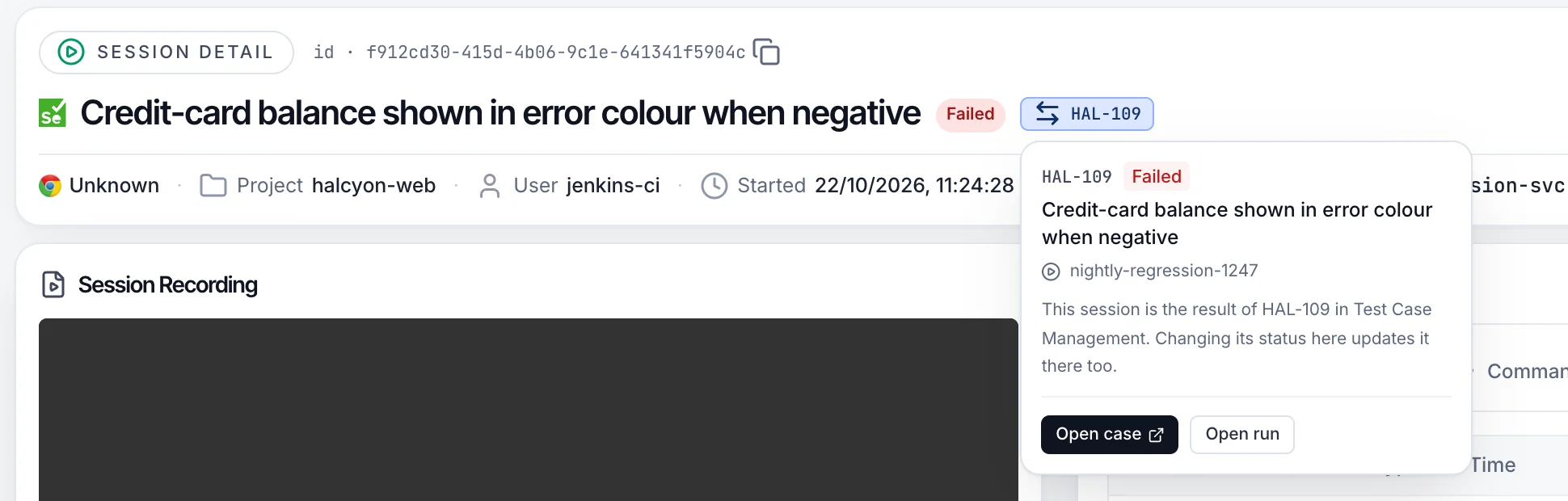
ui-v2/session-classic/f912cd30…
SBOX session page for a failed session, with a HAL-109 chip next to the status. Its card reads: this session is the result of HAL-109 in Test Case Management; changing its status here updates it there too.
Session → case

Every finished session reports in

The result lands on the case, with browser, duration, grid node, queue time and video evidence attached.

Either side → the other

Change a verdict once

Mark a session passed or failed in SBOX and the case follows. A tester's pass or fail in TCM is written back to the session.

Case → grid

Run manually on the grid

Run manually opens a live SBOX browser at the environment's URL, already linked to the case it is testing.

In TCM · the same result
ui-v2/tcm/runs/nightly-regression-1247 · executions
Executions in the TCM run nightly-regression-1247: HAL-109 failed, linked to SBOX session f912cd30, the same session shown on the left.

Runs build themselves

Results that share an e34:buildName become one automated run, named after the build. No setup per pipeline.

Tester verdicts are protected

A session never overwrites a result a person already recorded. It only adds the evidence.

Late results still count

When a test reports its status after the session ends, the case is updated and run totals are recalculated.

Built to keep up

Sessions are delivered through a queue at least once, so a restart doesn't lose a result.

Connect automation

One line in your test. No importer.

Every case shows the exact capability to add. Your tests keep reporting pass or fail to SBOX as they do today, and SBOX matches the finished session back to the case.

  • Match by case key, or aim at a planned run or a single execution.
  • Works on any session your grid already runs, from any language binding.
  • Coverage updates itself. A manual case that starts reporting from automation is marked as covered by both.
e34:tcmCaseKeye34:tcmRunIde34:tcmExecutionIde34:tcmCaseVersione34:tcmEnvironmente34:buildName
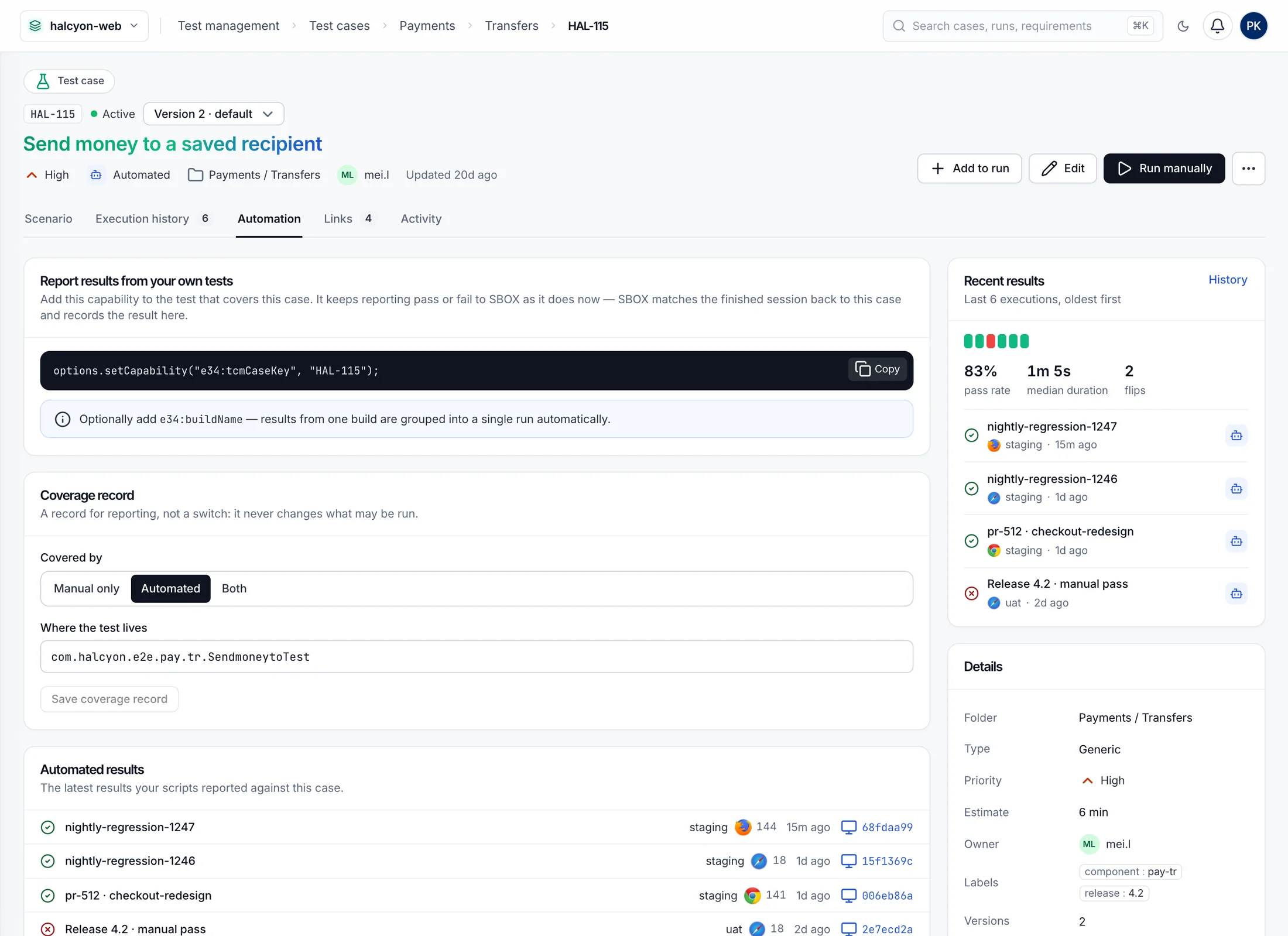
ui-v2/tcm/cases/HAL-115 · automation
Case HAL-115 Automation tab: the capability line to copy, the coverage record, and the latest automated results with their SBOX session links.
Manual testing

Manual testing on real grid browsers.

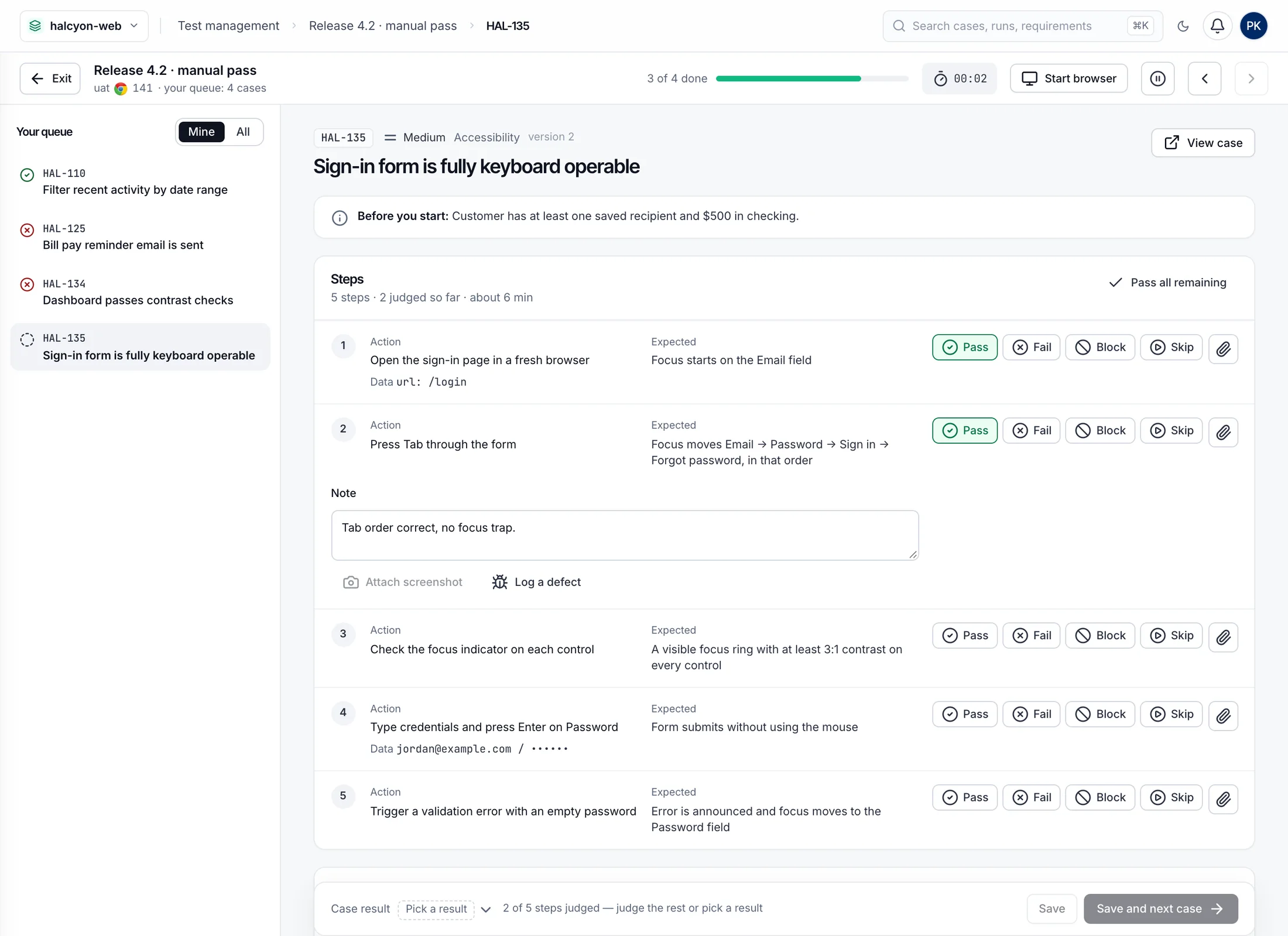
Testers work through a queue in a focused runner. One click opens a live SBOX browser beside the steps, so there's no local setup and no browser mismatch.

  • Step-by-step verdicts with notes, defects and screenshots taken from the live browser.
  • Pick up where you left off. Work that's abandoned for 15 minutes goes back to the pool, with its step verdicts kept.
  • Assignee-only results when your process needs them.
Runner: PassFailBlockSkip · Save and next case
ui-v2/tcm/executions/HAL-135/run
Manual runner for HAL-135 Sign-in form is fully keyboard operable: personal queue, five steps with Pass, Fail, Block and Skip, a timer and a Start browser button.
Test runs

Manual and automated, in one run.

A release pass mixes testers and pipelines. TCM puts them on the same run, so one place answers how the release is doing.

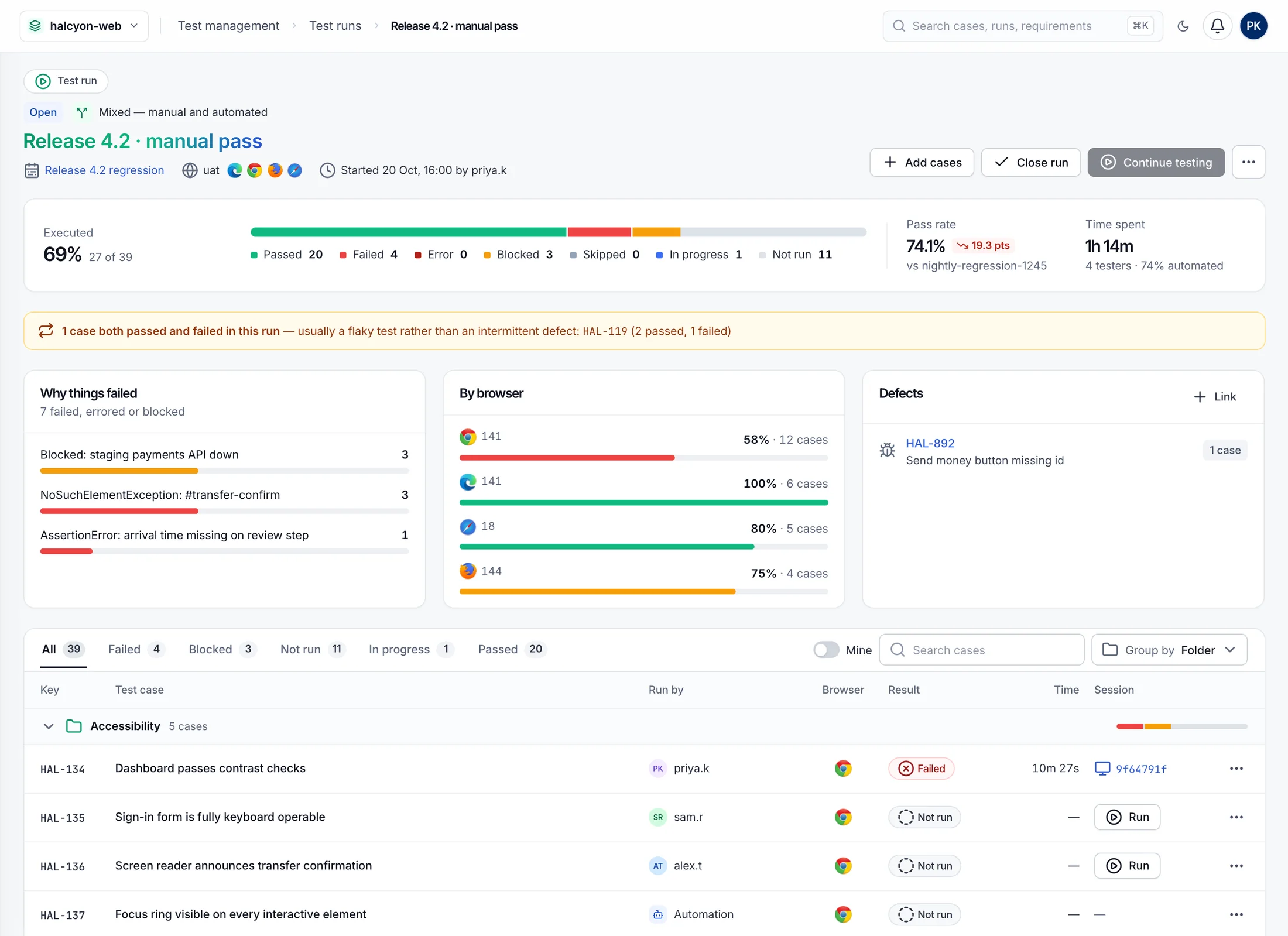
  • Why things failed, grouped by message, alongside results by browser and the defects raised.
  • Flaky tests flagged when a case both passed and failed inside one run.
  • Honest statuses. No result and Error stay separate from Failed, so a broken run never reads as a broken product.
ui-v2/tcm/runs/release-4.2-manual-pass
Mixed manual and automated run for Release 4.2: pass rate, status breakdown, failure reasons, results by browser and executions grouped by folder.
Session links

A typo in CI never becomes a coverage hole.

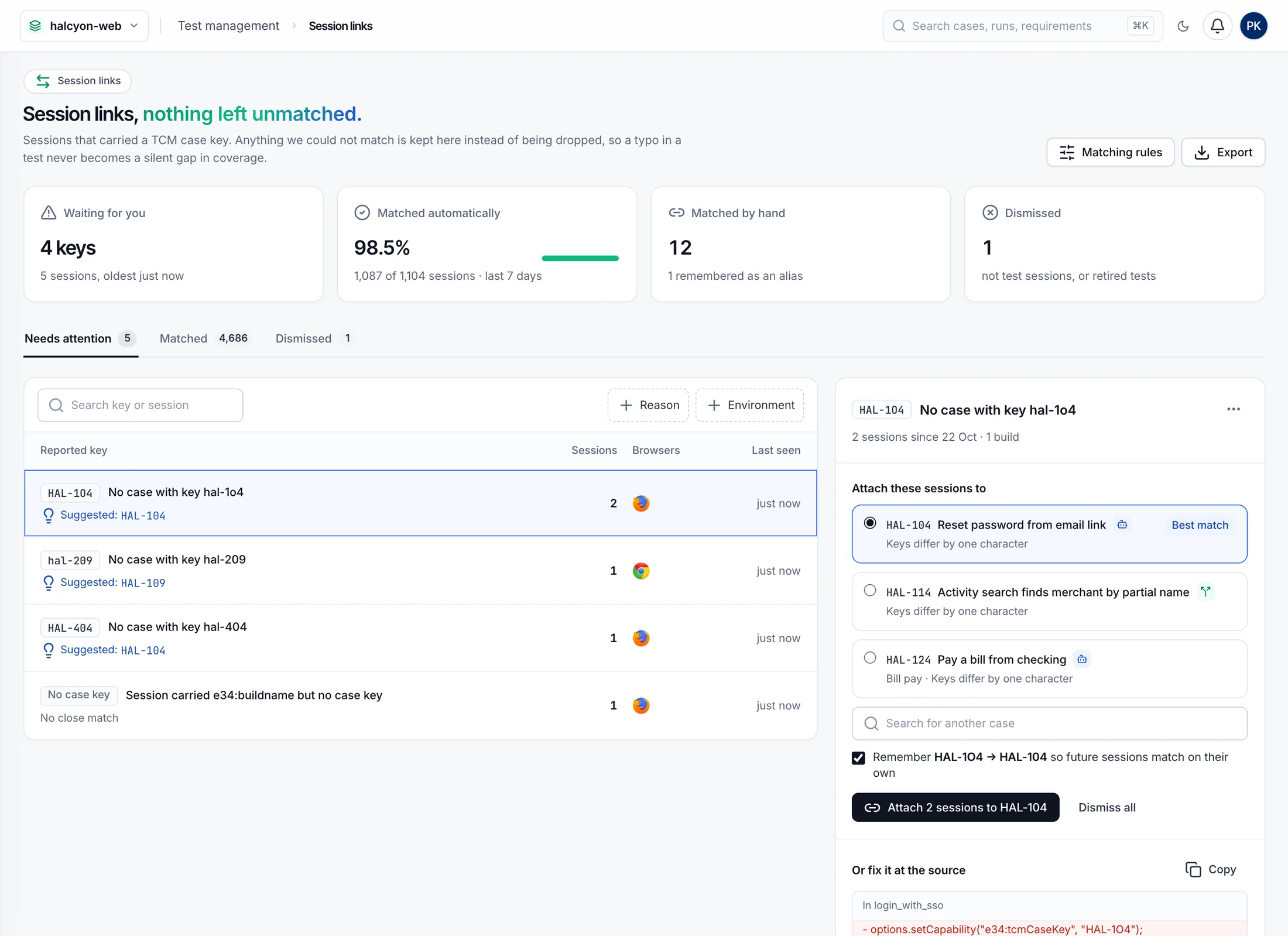
Sessions whose case key matches nothing are kept for triage. TCM suggests the case you probably meant, and can remember the mapping so the same key matches on its own next time.

  • Attach in bulk every session that reported the same wrong key.
  • Matching rules map old or mistyped keys, such as those carried over from a previous tool, to the right case.
  • Fix it at the source with the corrected capability line, ready to copy.
ui-v2/tcm/unmatched · needs attention
Session links: 4 keys waiting, 98.5% matched automatically, and an unmatched key hal-1o4 with ranked suggestions and a remember-this-mapping option.
Plans & requirements

Know when you can ship.

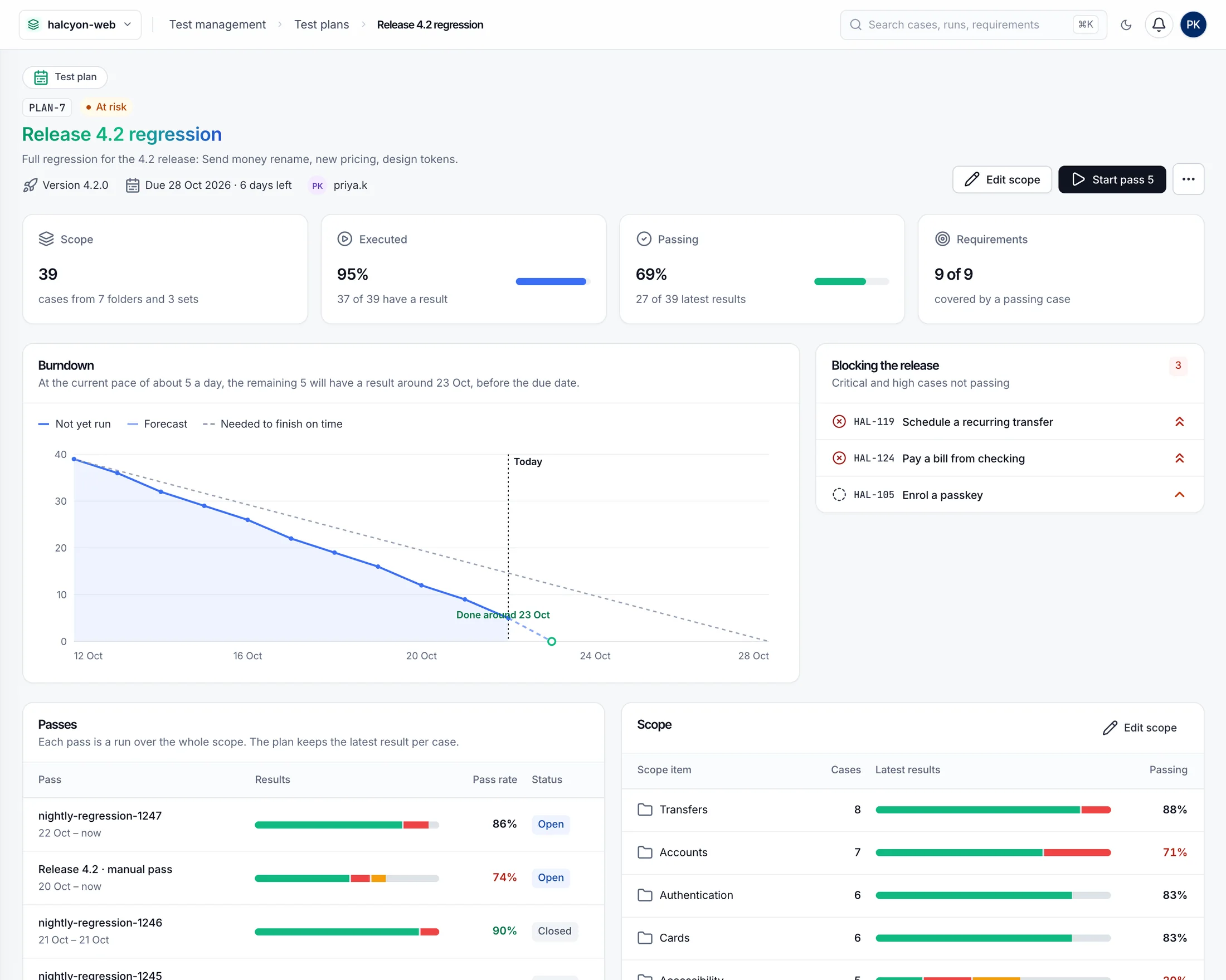
A test plan is the scope of a release, tracked across every pass. Requirements show whether what you said you'd build is covered and passing.

  • Burndown with a forecast against the plan's due date.
  • Coverage per requirement: covered, failing, partly passing, not run yet or untested.
  • Link to your tracker by issue key and URL, for requirements and defects alike.
ui-v2/tcm/plans
Test plan Release 4.2 regression: scope, executed, passing and requirement tiles, burndown with forecast, blocking cases and passes.
Test library

Write a case once. Run it anywhere.

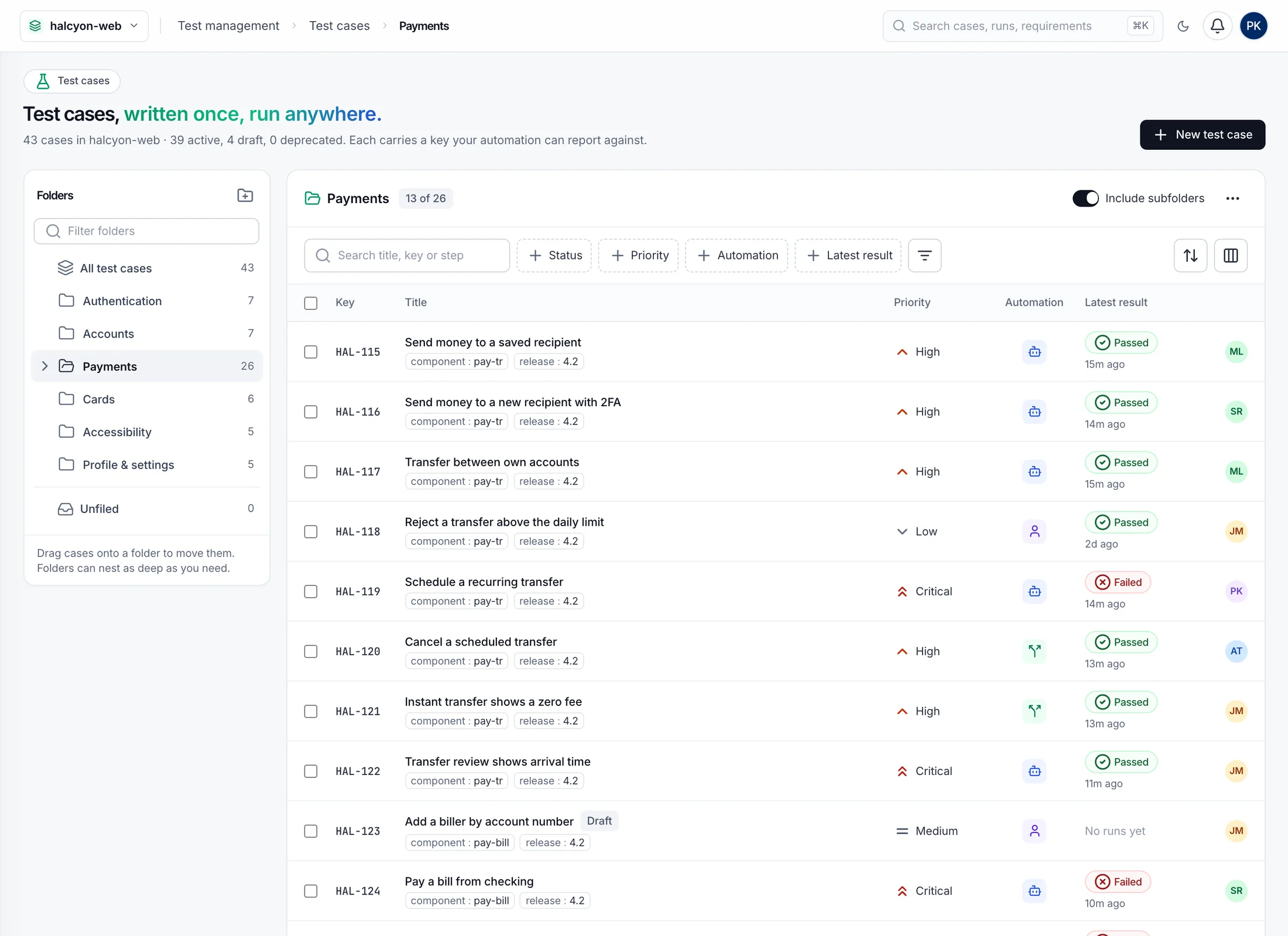
Nested folders, versioned steps and a review cycle keep a large library trustworthy. Executions pin the version they ran, so last year's result still shows last year's steps.

  • Draft, in review, approved, with an optional rule that only approved cases can be run.
  • Shared preconditions, test sets and environments reused across the library.
  • Manual, Generic and Cucumber test types, with labels and external references that keep migrated keys working.
ui-v2/tcm/cases
Test cases in the Payments folder with folder tree, keys, priority, automation and latest result.
SBOX Test Case Management
Insights

Ten dashboards, from the tests you already run.

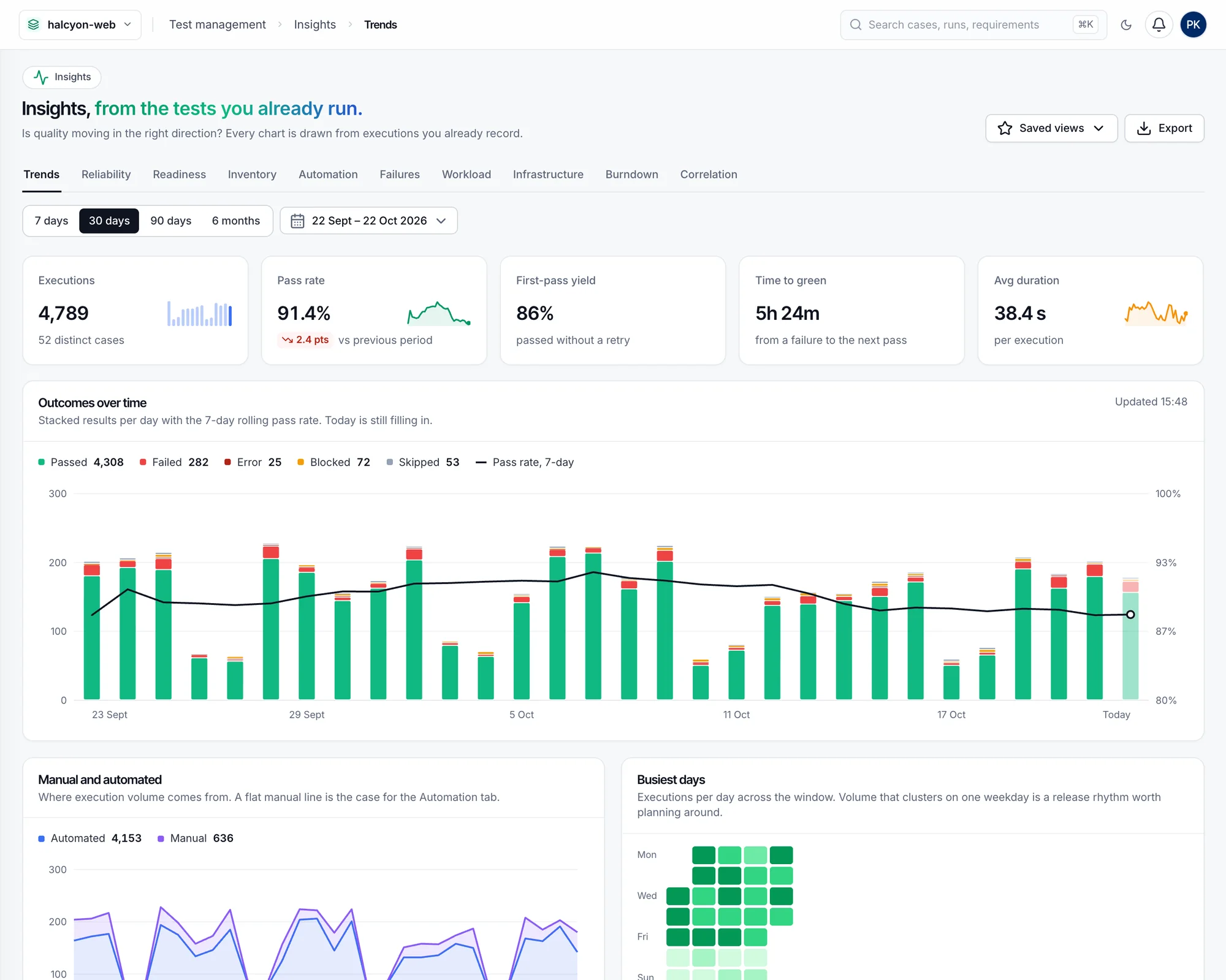
Every chart is drawn from executions TCM already records, manual and automated, filtered by date, environment, plan, mode or browser. Save a view, share it as a link, export it as CSV.

01 / 10

Trends

    ui-v2/tcm/insights/trends
    Settings & governance

    Your process, enforced per project.

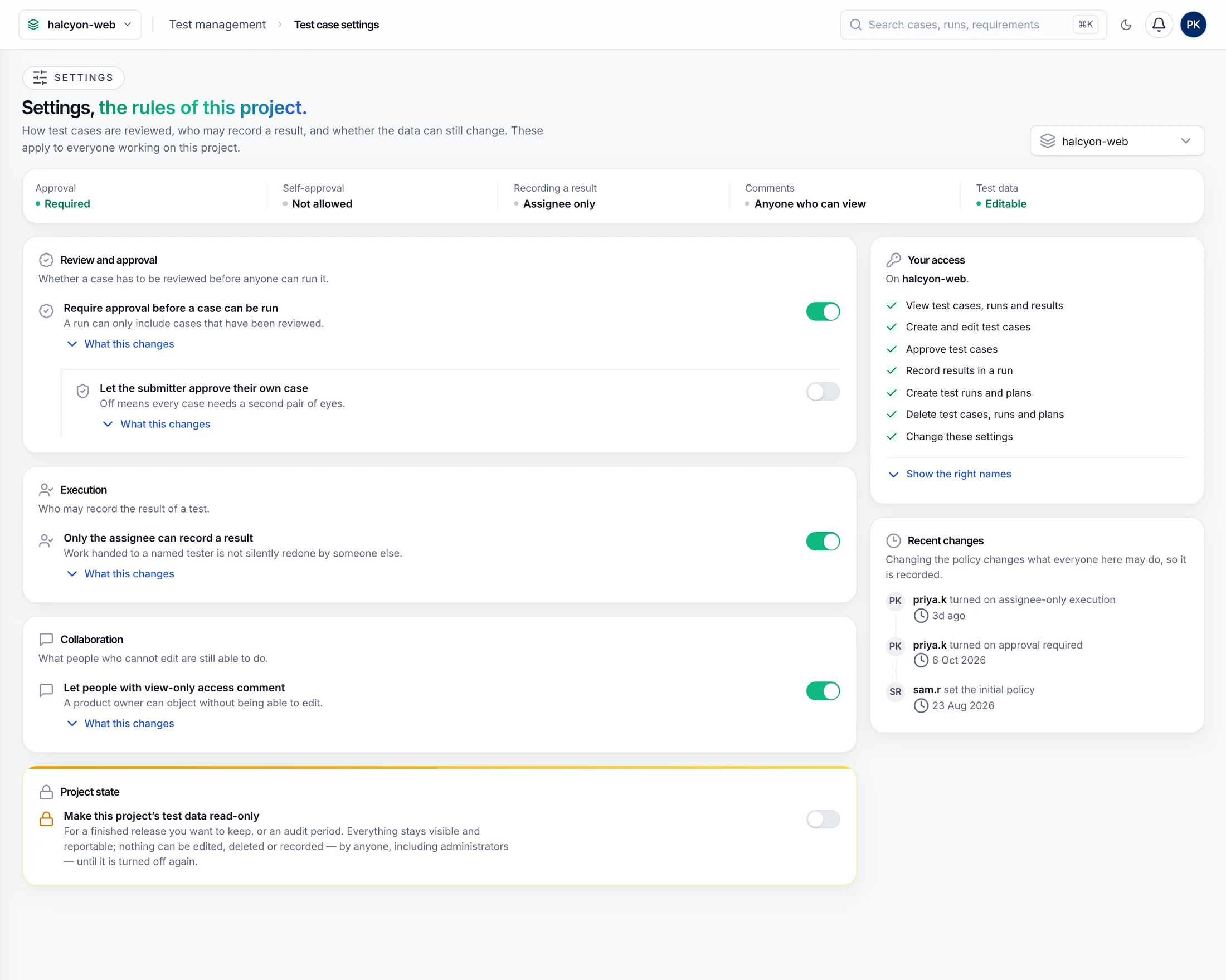
    A QA lead sets the rules for each project in plain language. Every change is recorded with who made it and when.

    • Require approval before a case can be run, and decide whether authors may approve their own.
    • Only the assignee records a result, so handed-out work isn't redone by someone else.
    • Read-only projects freeze a finished release for audit.
    tcm:readSee cases, runs and results
    tcm:writeAuthor cases and folders
    tcm:runRecord results
    tcm:approveApprove or reject cases
    tcm:planCreate runs, plans and sets
    tcm:adminProject settings and environments
    ui-v2/tcm/settings
    Test case settings: review and approval, execution and project-state policies with switches, the signed-in user's access, and recent changes.
    Private by design

    Test management that stays inside.

    Hosted test management tools hold your cases, steps and results in their cloud. TCM runs next to your grid, on your infrastructure.

    Your database

    Cases and results live in the PostgreSQL your SBOX already uses.

    Docker or Kubernetes

    Started by the hub when licensed, or enabled with one Helm value.

    Scales out

    Several replicas share the session queue between them.

    Your identity

    The same SBOX users, projects and SSO, with rights scoped per project.

    Full history

    Every status change, approval and policy edit is kept with its author.

    Evidence on the grid

    Video and logs stay on the SBOX session, one click from each result.

    How do automated tests report to TCM?

    Add e34:tcmCaseKey with the case's key to the session's capabilities. When the session finishes, SBOX matches it to the case and records the result. Add e34:buildName and results from the same pipeline are grouped into one run.

    What does "two-way sync" mean exactly?

    A session's result flows into its case. A status changed later in SBOX, by the test or by a person, updates the case too. A pass or fail a tester records in TCM is written back to the linked SBOX session. Blocked and skipped stay in TCM, since SBOX has no equivalent status.

    What happens when a test reports a key that doesn't exist?

    The session is kept on the Session links page instead of being dropped. You can attach it to the right case, and optionally remember that mapping so future sessions with the same key match on their own.

    Can testers run manual cases on grid browsers?

    Yes. Run manually opens a live SBOX browser in the runner, pointed at the environment's URL and already linked to the case, using the tester's own manual-testing permissions.

    How is TCM licensed?

    TCM is an SBOX add-on that follows Element34's annual licence model, so cost doesn't depend on how many cases or results you store.

    Bring your next release plan.

    We'll connect one of your pipelines with a single capability, run a manual pass on your private grid, and show you the plan, the burndown and every result in sync.