Element34
New · Lens visual testing

Your tests passed. Did the page still look right?

Lens catches the visual bugs functional tests miss. It diffs every checkpoint against its approved baseline, filters out rendering noise, and explains each real change, all inside your private SBOX, self-hosted or managed as a single-tenant instance dedicated to you.

  • Selenium and Playwright
  • Screenshots stay in your bucket
Selenium Box · Lens
nightly-regression-1247
Review 6Auto-approved 3
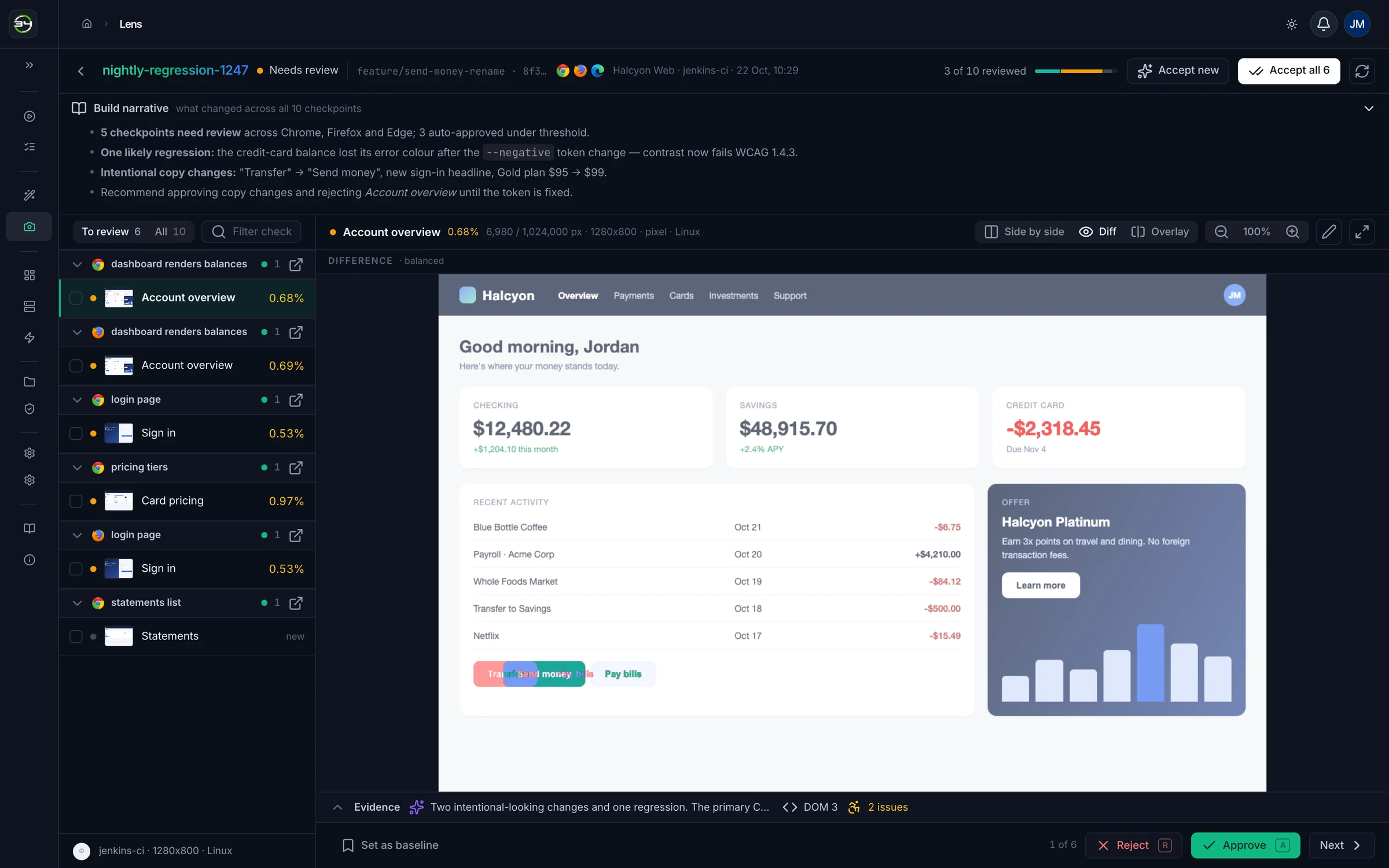
Lens build review in dark mode: AI build narrative, a checkpoint queue grouped by test, and the Account overview diff with changed pixels in red.
0SDKs or agents to install
3ways to compare every diff
4match levels, pixel to layout
5AI add-ons, toggled per project
Review

Review a whole build in minutes.

Every checkpoint in a build lands in one queue, grouped by test and browser. Compare it to the baseline, decide, and move on.

  • Side by side, diff or overlay. Red pixels over the current run, or a slider between base and actual.
  • Bulk actions. Accept every new screen, or the whole build, in one click. Undo restores the previous status.
  • Set as baseline. Promote any actual to the new approved screen.
Keyboard-first: A approve R reject 123 views
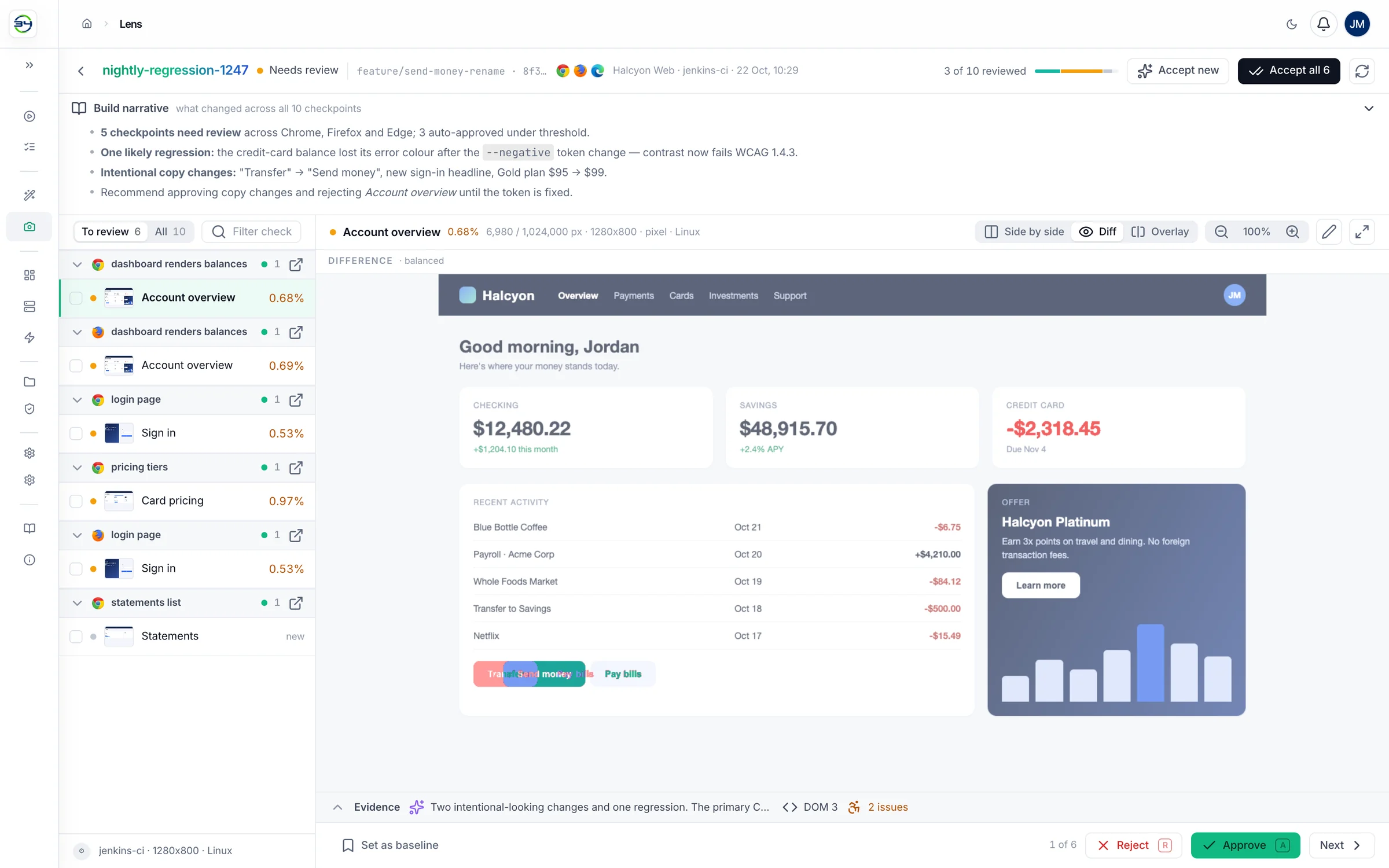
ui-v2/visual-testing/nightly-regression-1247 · diff
Diff view: changed pixels in red over the current screenshot, with AI narrative, checkpoint queue and Approve and Reject controls.
Signal over noise

Noise is handled before anyone looks.

Naive screenshot tools flag every anti-aliased edge, and reviewers learn to click Approve all. Lens settles the obvious cases on its own, so people only see changes that need a judgement.

  • Anti-aliasing excluded and identical screens skipped by perceptual hash.
  • Ignore regions and per-region thresholds for timestamps, carousels and checkout totals.
  • Thresholds per project, with any checkpoint able to override them in code.
PixelIgnore coloursContentLayout
  1. Zero pixels changeddiff = 0Approved
  2. Below the noise floorratio < 0.1% (default)Approved
  3. Over the auto-reject bandratio ≥ auto-reject overAuto-rejected
  4. Inside the auto-approve bandratio < auto-approve underAuto-approved
  5. AI says it's rendering noisemodel must answer exactly YESAI approved
  6. Everything elsea real change for a personNeeds review
Lens AI

Every diff, explained.

A red blob tells you something moved. Lens AI tells you what moved, why it probably moved, and whether it broke accessibility.

  • Semantic diff and root cause, with a confidence level and the affected elements.
  • Accessibility check for lost contrast, smaller text or targets, missing focus rings and colour-only meaning.
  • Build narrative: a plain-English changelog for the build, with duplicates across browsers merged.
  • Runs on your model. OpenAI, Anthropic, or an OpenAI-compatible gateway inside your network.
Build narrativewhat changed across all 10 checkpoints
Build narrative summarising five checkpoints to review, one likely regression from a token change, and intentional copy changes.
Root causeAccount overview · chrome 141
AI analysis: what changed, likely cause with affected selectors, and measured difference.
Accessibility2 issues found
Accessibility findings: a colour contrast regression and a label-in-name issue.
Builds & baselines

Baselines that follow your branches.

Each build carries its branch, commit and browsers. A feature branch compares against its own approved screens and falls back to main when it has none.

  • Merge baselines from one branch to another in a single call.
  • Viewport, OS and device are part of the baseline key, so responsive layouts get their own.
  • Per-project rights for who can see, review and move baselines.
lens:readlens:reviewlens:baselinelens:configure
ui-v2/visual-testing
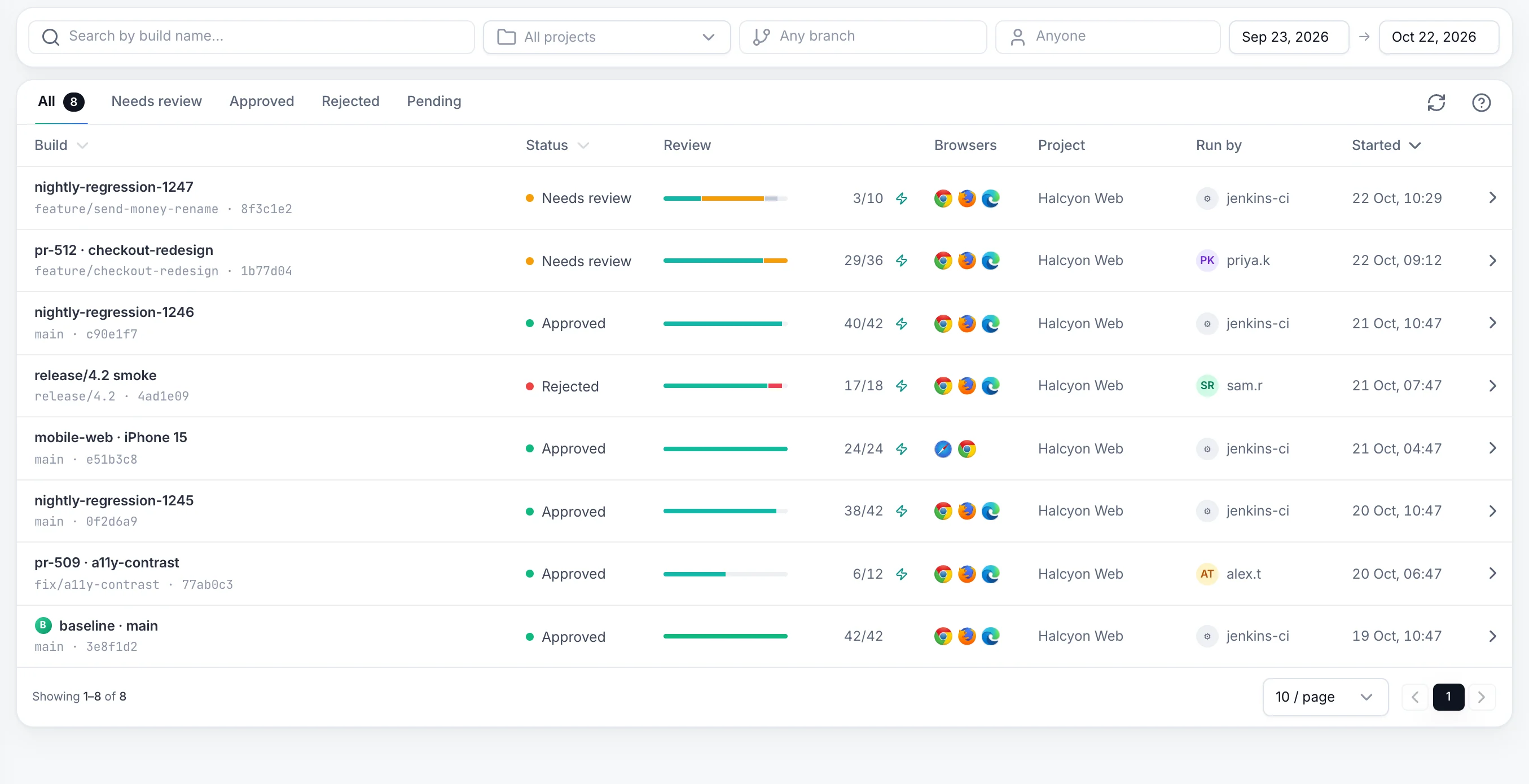
Lens builds list: builds by branch and commit with review progress, status, browsers, author and start time.
Activation

One capability. One call. No SDK.

Turn on e34:lens and drop a checkpoint wherever a screen matters. The hub takes the screenshot. Then let CI ask whether the build is clean.

200Every checkpoint approved
422Rejected, unreviewed or new
// 1. Turn Lens on for the session
options.setCapability("e34:token", token);
options.setCapability("e34:lens", true);options.setCapability("e34:branch", "feature/send-money-rename");

// 2. Checkpoint any screen
driver.executeScript("sbox_executor", Map.of(
  "action", "visualSnapshot",
  "arguments", Map.of(
    "name", "Account overview",
    "viewport", "1280x800")));
Private by design

Visual testing for teams that can't upload screenshots.

Hosted visual testing sends every screen of your app to someone else's cloud. Lens runs on the same private grid as your tests.

Self-hosted or managed, always single-tenant

Run Lens in your own network, or on dedicated servers Element34 manages for you. Never shared with other customers.

Your bucket

Images go to your S3-compatible storage, including MinIO and Dell ECS.

Your model

Point AI at an internal gateway and screenshots never leave the network.

Kubernetes-native

Autoscaling workers in the SBOX Helm chart, non-root and PodSecurity-ready.

Reliable queue

Retries and a dead-letter list. A worker restart doesn't lose a checkpoint.

Corporate PKI

Trust internal CAs, so TLS-intercepting proxies don't break comparisons.

Who decided what

Every checkpoint records who reviewed it, when, and how.

Do I need an SDK or a new framework?

No. Set e34:lens on the session and call the sbox_executor action visualSnapshot where a screen matters. With e34:lensOn: "navigate", Selenium sessions checkpoint every page load with no extra calls.

How does Lens avoid flaky diffs?

It excludes anti-aliased pixels, skips identical screens by perceptual hash, applies a noise-floor threshold, and supports ignore regions, per-region thresholds and four match levels. With Lens AI, a model can approve pure rendering noise, but only on an unambiguous yes.

Do my screenshots go to a public AI service?

Only if you configure it that way. Lens AI sends the baseline and changed screenshot to the provider endpoint you set, which can be an OpenAI-compatible gateway inside your network. Without Lens AI, comparison is fully local.

Which browsers and frameworks are supported?

Selenium 3, Selenium 4 and Playwright sessions on SBOX, across the browsers your grid runs, including Chrome, Firefox and Edge. Every checkpoint records its browser and version.

How is Lens licensed?

Lens is an SBOX add-on, and Lens AI is a separate add-on on top of it. Both follow Element34's annual licence model, so cost doesn't depend on how many screenshots you compare.

Bring us the screen that broke last quarter.

Send one regression suite. We'll switch on Lens on your private grid, run two of your builds, and show you every diff it catches and every one it filters as noise.